
The Real Benefits of Using a Unicode to Bijoy Converter With Voice Typing
If you work with Bangla text in any professional or academic capacity, you already know the frustration. You write something in Unicode, paste it into an older system, and the characters turn into garbage. Or you get a Bijoy-encoded document and have no way to display it properly on your phone.
It is far more common than it sounds — journalists, students, government workers, and bloggers across Bangladesh deal with this every single day. Bangla Converter Tool was built specifically to eliminate that friction.
This post goes deep into what the tool actually does, how its two core features work, and why each benefit matters in real-world use.
What You Are Actually Dealing With: The Unicode – Bijoy Split
Before getting into the tool itself, the problem needs a clear framing — because the split between Unicode and Bijoy is genuinely unusual compared to what most digital users experience.
Unicode is a universal character encoding standard that covers every language on earth. Every modern browser, smartphone, and web platform runs on it natively. When you type Bangla on Facebook, WhatsApp, or any website, that text is Unicode.
Bijoy is an ANSI-based encoding system with a 256-character limit, developed for Bangla typography in Bangladesh. It requires specific fonts to be installed — without them, text is completely unreadable. For decades, it was the standard for newspapers, government offices, and print publishing.
The problem is that both systems are still actively in use — but they are fundamentally incompatible. Text written in one format breaks entirely in the other. There is no automatic bridge between them built into any operating system or standard software. That gap is exactly what Bangla Converter Tool closes.
How the Converter Works
Bangla uses ligatures and conjuncts — combinations of letters that merge into a single visual form. These are not decorations; they are grammatically and visually essential to written Bangla. Bangla Converter Tool handles them accurately, producing clean output that reads exactly as intended.
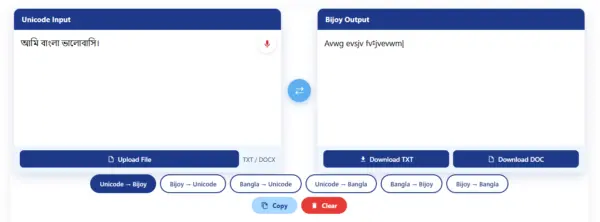
1. Unicode to Bijoy
This direction is used when you have text sourced from the web, a blog, a news site, or any digital platform, and you need it in a format that works with legacy desktop software — PageMaker, older Word versions, government-standard publishing tools. The converter takes Unicode Bangla and produces clean Bijoy-encoded output, ready to paste directly into those systems without reformatting.
This is not a trivial task. Unicode stores Bangla characters in a specific logical order that differs from how Bijoy encodes visual output. Handling that mapping accurately — especially for conjunct consonants — requires a purpose-built conversion engine, not a generic character substitution script.
2. Bijoy to Unicode
This direction solves the reverse problem: you have a legacy document, a scanned file processed through OCR, or content from an older publication — all in Bijoy — and you need it online, in a CMS, on social media, or readable on a mobile device. Without conversion, that text appears as random symbols on any modern platform.
After conversion, the output is standard Unicode, compatible with every web platform, searchable by Google, and readable on any device without additional fonts installed.
Both directions work within the same single-page interface, with no account, no installation, and no file size limitations from software licensing.
The Tool’s Core Advantages
Completely free, no hidden limits
No premium tiers, no word count caps, and no feature locks. Whether you are converting a single sentence or a fifty-page document, the tool treats every request the same way. No subscription, no trial period, no “upgrade to unlock” wall anywhere in the workflow.
Output is immediately usable
Converted text does not arrive with stray characters, broken spacing, or formatting that needs manual correction. The output is clean and paste-ready — drop it directly into PageMaker, a government form, a CMS, or a Word document and it works as expected. No post-conversion cleanup step.
Works without a stable internet connection
Once the page loads, the conversion engine runs entirely inside the browser. If your connection drops mid-task, the tool keeps working. Your text does not disappear, the conversion does not fail, and you do not lose progress — particularly useful in areas where connectivity is inconsistent.
No account or sign-up required
No registration form, no email verification, and no profile to manage. Open the URL, use every feature the tool offers, and close the tab when you are done. Nothing is stored on the platform’s end, and nothing is asked of the user before they can start working.
Handles professional document formatting directly
Government offices and newspapers in Bangladesh require Bijoy-formatted documents. The converter handles this without the user needing to manually reformat source material. Paste your Unicode text, convert, and the Bijoy output is ready for the target software.
No technical knowledge required
The workflow is paste → convert → copy. Users do not need to understand encoding standards, font installations, or software configuration. The tool handles all of that internally.
Voice Typing: The Feature That Changes How You Write Bangla
Voice input is not an add-on to the converter — it is a fundamentally different way of producing Bangla text, and it addresses a separate set of problems that the text converter does not touch.
The core challenge with typing Bangla is the keyboard itself. The Bijoy keyboard layout requires users to memorize specific key positions for Bangla characters — positions that have no intuitive relationship to the phonetic sound of the character. Phonetic layouts are slightly more accessible but still require practice and produce errors when key positions get mixed up.
Voice input removes the keyboard entirely from the process. You speak, and the tool converts your speech directly into Bangla text — in Unicode or Bijoy format, depending on what you need. Your voice is processed locally in the browser; no audio data is stored or transmitted.
What Voice Input Unlocks for Specific Users
No keyboard memorization needed
The Bijoy layout demands memorizing key positions with no intuitive link to a character’s sound, and even phonetic layouts produce errors when key positions get mixed up. Voice input removes the keyboard from the process — you simply speak instead of hunting for the right key.
Faster than typing for long passages
Speaking a paragraph takes far less time than typing it character by character. For long passages like articles, reports, or letters, dictation captures your words at the speed of speech.
Accessible for users who struggle with typing
Slow typists, users who never learned a Bangla keyboard layout, and people with physical difficulty using a keyboard can still produce clean Bangla text. Voice input lowers the barrier to writing in Bangla.
Hands-free dictation
You can draft text while your hands are busy with something else. Speak your sentences and the tool converts your speech directly into Bangla text, ready to use.
Private — audio processed locally, nothing stored
Cloud transcription tools send your audio to a remote server; Bangla Converter Tool processes speech in real time, locally in the browser. Nothing is stored or transmitted, which matters when you dictate official documents, confidential reports, or personal writing.
Outputs directly in Unicode or Bijoy
Your spoken words become Bangla text in whichever format you need — Unicode for the web and modern apps, or Bijoy for government offices, newspapers, and PageMaker. No retyping between formats.
The Privacy Point
Voice input in most cloud-based transcription tools sends audio to a remote server for processing. Bangla Converter Tool processes speech in real time, locally in the browser. Nothing is stored. This matters for users dictating content that may be sensitive — official documents, confidential reports, personal writing.
Real-World Use Cases: Who Benefits Most
Different people hit the Unicode–Bijoy wall in different ways. A unicode to bijoy converter is not just a convenience — for many professionals in Bangladesh, it is a daily necessity. Here are the four groups who gain the most from a fast, accurate converter.
Newspaper DTP Operators
Newsroom DTP operators routinely pull articles from news websites and wire services — all in Unicode — and lay them out in PageMaker, which only accepts Bijoy. Instead of retyping every story, they paste the article into the converter and drop clean Bijoy text straight into the layout. Deadlines that once meant hours of retyping now take minutes.
Government Clerks
Government offices across Bangladesh still require official documents, circulars, and forms in Bijoy format. Clerks who draft in Unicode on modern computers can convert their work instantly instead of retyping it into legacy software. The result is faster file processing with fewer transcription errors in official records.
Students
Students write assignments and theses in Unicode using tools like Microsoft Word or Google Docs, but many university departments and exam boards still accept Bijoy-formatted submissions. A quick conversion bridges that gap, so students can submit in the required format without retyping pages of work.
Bloggers and Content Creators
Bloggers publish in Unicode on WordPress, but when the same content goes to print — a magazine column, a book chapter, a newspaper op-ed — the publisher needs Bijoy. Converting online lets creators move a single piece of writing between web and print without maintaining two separate versions.
Unicode to Bijoy vs Manual Retyping: Time Saved
Anyone who has retyped a Bangla document by hand knows it is slow, error-prone, and exhausting. Here is a direct comparison of the two approaches for anyone weighing whether a bijoy converter online is worth using.
Manual Retyping: Retyping means reading the source, switching keyboard layouts, and keying every character by hand. A careful typist manages 15–20 Bangla words per minute — and every conjunct is another chance for a mistake. Formatting, line breaks, and special characters all have to be recreated from scratch.
Using the Converter: With the converter, the same task is paste, convert, copy. The engine maps every character and conjunct in seconds, preserving the original wording exactly. There is no layout to rebuild and no keystroke errors to hunt down afterward.
Take a realistic example: a 500-word news article. Retyped by hand at 20 words per minute, that is 25 minutes of focused typing — plus proofreading time to catch the inevitable errors in conjuncts. Run through a unicode to bijoy converter, the identical article converts in under a minute, including a quick visual check of the output. That is a time saving of over 95%, and the gap only widens with longer documents. For newsrooms, offices, and students working against deadlines, that difference is the entire argument.
Tips for Best Conversion Results
A few simple habits will make every conversion cleaner. Follow these tips to get the best results from the tool:
Paste clean text
Strip out images, tables, and embedded objects before converting — the tool converts text, not layouts. Pasting plain, clean text keeps the output predictable and avoids stray characters from formatting code hiding inside copied content.
Check conjuncts after converting
Bangla conjuncts are the trickiest part of any encoding conversion. After converting, skim the output for merged letters and verify they rendered correctly. A ten-second visual check catches the rare mapping the engine could not resolve on its own.
Choose the right direction first
Make sure you select Unicode to Bijoy or Bijoy to Unicode before you convert. Converting in the wrong direction produces unreadable output that has to be redone — a quick glance at your source text tells you which way to go. Readable on the web means Unicode.
Keep a backup of the original
Always keep a copy of your source text until you have verified the converted output. If you spot an issue later, having the original on hand means you can reconvert in seconds instead of hunting down the source again.
Frequently Asked Questions
Bridge the Encoding Gap Today
The Unicode–Bijoy gap is a structural problem in Bangladeshi digital infrastructure. As long as government offices, print publications, and modern web platforms operate on different encoding systems, you need a reliable way to move text between them cleanly and accurately.
Bangla Converter Tool handles both directions, runs on any device, requires no installation, and adds fast, private voice input.

The explanation of why Unicode and Bijoy still clash in everyday workflows was really useful, especially the point about older government and publishing systems still depending on ANSI-based encoding. A lot of people outside Bangladesh probably don’t realize how much time gets wasted fixing broken Bangla text between platforms, so having a smoother way to handle conversions and voice input can make a big difference for productivity.