
Avro vs Bijoy: Which Bangla Typing System Should You Use in 2026?
If you’ve ever asked a Bangladeshi colleague how they type Bangla and gotten two completely different answers, you’ve already run into this debate. Some people swear by Avro because they never had to memorize a single key. Others, usually the ones who learned typing at a newspaper desk or a government office in the 2000s, will tell you Bijoy is faster once you know it, and that “real” Bangla typists use Bijoy.
Both camps are right, just for different reasons. This guide breaks down what Avro and Bijoy actually are, where each one wins, and which one makes sense for your specific situation in 2026 — whether you’re a student typing an assignment, a journalist filing on deadline, or an office worker stuck converting old Bijoy files into something a modern website can read.
What Is Avro?
Avro Keyboard is a free, open-source Bangla typing application built by OmicronLab, first released in 2003. Its core idea is phonetic typing: you type Bangla words the way they sound using English letters, and Avro converts them into Bangla script as you go. Type “ami” and it becomes “আমি.” Type “banglades” and it becomes “বাংলাদেশ.”
This phonetic approach is why Avro became the default choice for an entire generation of Bangla computer users. You don’t need to learn a keyboard layout, memorize key positions, or take a typing course. If you can spell a Bangla word out phonetically, you can type it.
A few things worth knowing about Avro heading into 2026:
- It’s still completely free and open-source (MPL-2.0 license): no paid tier, no watermark.
- It includes a built-in dictionary of roughly 150,000 Bangla words with autocorrect, which speeds up phonetic typing considerably.
- Beyond phonetic input, Avro also supports fixed keyboard layouts, including a UniBijoy mode which is Avro’s Unicode-based version of the Bijoy layout, letting Bijoy-trained typists use their muscle memory while still producing Unicode text.
- It’s primarily built for Windows, though browser-based and mobile alternatives following the same phonetic principle exist.
Avro Phonetic Keypad
Type English letters the way Bangla sounds — Avro converts as you type
Common mappings — Avro also autocorrects from its 150,000-word dictionary as you type.
What Is Bijoy?
Bijoy is older and structurally different. Developed by Mustafa Jabbar and commercially launched in 1988, it was the first Bangla typing system to see mass adoption in Bangladesh, and for decades it was the standard in newspapers, government offices, and print publishing. If you’ve worked with a Bangladeshi newsroom or an official government document from before the mid-2010s, there’s a strong chance it was typed in Bijoy.
Two things define Bijoy:
- Fixed key positions. Every Bangla character sits on a specific key, similar to how QWERTY assigns fixed positions for English letters. There’s no phonetic guessing; you memorize where প, র, and ক sit on the keyboard, the same way a touch typist memorizes an English layout.
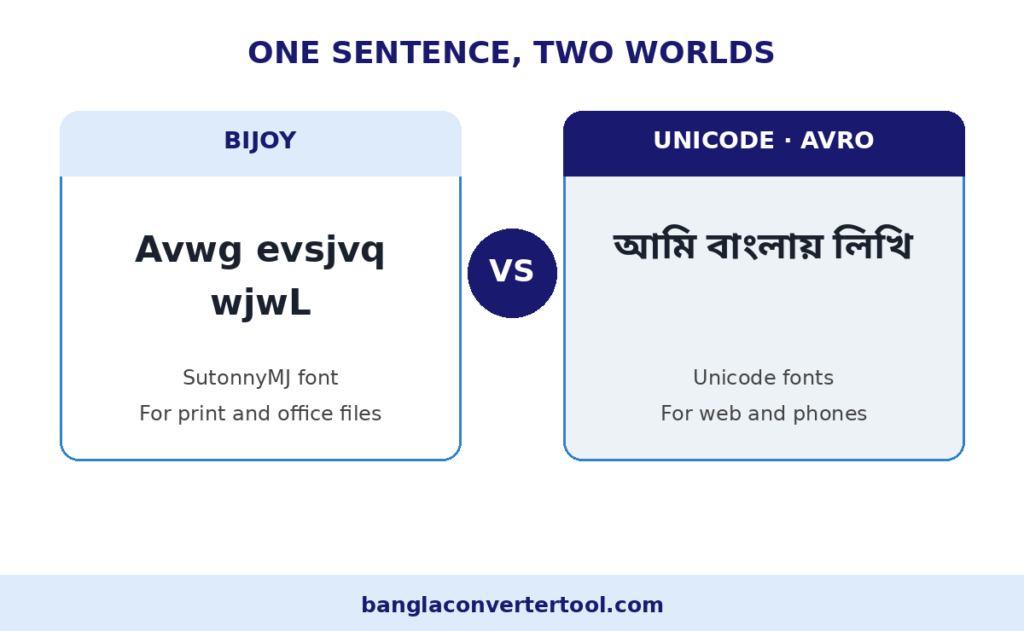
- ANSI/legacy encoding. This is the part that causes most of the modern-day headaches. Bijoy doesn’t use Unicode. It relies on custom fonts like SutonnyMJ that remap standard ANSI character codes to Bangla glyphs. This worked fine in the era of Windows desktop publishing, but it’s fundamentally incompatible with how the modern web, mobile operating systems, and search engines read text — see our Bijoy fonts guide.
That encoding gap is the entire reason tools like ours exist. Bijoy text pasted into a website, a WhatsApp message, or a mobile app shows up as broken boxes or garbled symbols unless it’s converted to Unicode first.
Avro vs Bijoy: Side-by-Side Comparison
Before picking a side, it helps to see both systems laid out against the factors that actually matter day to day: how fast you can learn them, how well they play with modern devices, and whether your content stays visible once it’s published. The table below breaks down each of these points so you can judge which system fits your workflow instead of just going with whatever your college or office happened to teach you
| Factor | Avro | Bijoy |
|---|---|---|
| Learning curve | Minutes. Phonetic, no memorization needed | Weeks to months. Fixed layout, needs practice |
| Typing speed | Fast, though phonetic ambiguity can slow complex words | Faster once trained. No phonetic guessing |
| Encoding | Native Unicode Modern | ANSI / legacy. Needs conversion for digital use |
| Web & mobile support | Works everywhere out of the box | Breaks without a Bijoy compatible font or conversion |
| SEO visibility | Fully indexable by Google and other search engines | Invisible to search engines unless converted to Unicode |
| Cost | Free and open source | Free to type with, font dependent |
| Who still uses it | Students, bloggers, younger professionals, web writers | Legacy government files, some newspapers, older print workflows |
| Best for | Digital first work: websites, social media, apps, documents shared online Recommended | Institutions still standardized on Bijoy for internal or print workflows |
Which One Should You Actually Use in 2026?
Here’s the honest answer: for anyone starting fresh today, Avro is the better choice, and it isn’t particularly close. The reason isn’t that Bijoy is a bad system; it’s that the constraint that made Bijoy dominant in the 1990s and 2000s (limited software, print-first workflows) no longer applies. Nearly everything you’ll type today ends up online in some form: a Facebook post, a university assignment submitted as a PDF, a WhatsApp message, a blog, a resume uploaded to a job portal. All of that infrastructure runs on Unicode. Text typed in Bijoy simply doesn’t display correctly on a phone, in a browser, or in a search result without an extra conversion step.
That said, Bijoy hasn’t disappeared, and there are real situations where you still need it:
- You work with a government office, court, or older newspaper that still standardizes on Bijoy internally.
Some institutional workflows in Bangladesh haven’t migrated, and digital archiving of decades of Bijoy-encoded records is genuinely still an unresolved challenge at a national level. - You’re a trained Bijoy typist working under tight deadlines.
If you’ve spent years building muscle memory on the Bijoy layout, your raw typing speed on it may still beat phonetic input. Avro’s UniBijoy mode lets you keep that speed while outputting Unicode instead of legacy encoding. - You’re editing or digitizing old Bijoy documents.
Old memos, print archives, and legacy office files are still commonly stored in Bijoy encoding and need to be converted before they’re usable anywhere online.
For everyone else students, bloggers, content writers, small business owners, anyone building a digital presence phonetic typing through Avro (or a similar Unicode-first tool) is faster to learn, and it means your content works everywhere without a conversion step in between.
The Real-World Fix: You Don’t Have to Pick Just One
In practice, most people who work with Bangla text professionally end up needing both systems at different points — not because they chose two typing methods, but because they inherit files, forms, or archives typed in Bijoy by someone else, while typing everything new in Unicode.
This is exactly the gap a Unicode-Bijoy converter is built for. Instead of retyping an entire document because it was created in the “wrong” encoding, you paste the text in, convert it, and move on. A few situations where this comes up constantly:
- A government form template exists only in Bijoy, but you need it usable on a website.
- An older colleague sends you a Bijoy-typed press release that needs to go up as a Unicode blog post.
- You’re digitizing print archives that were typeset in SutonnyMJ decades ago.
- You need to convert freshly written Unicode content into Bijoy for a printing house that still runs older desktop publishing software.
If you run into any of these, our Unicode to Bijoy Converter handles both directions in a single tool, including voice input if you’d rather speak the text than type or paste it.
Avro vs Bijoy: Speed Test for Daily Office Work
When people ask which system is faster, they usually picture a race: two typists, one keyboard, one stopwatch. In the real world, speed is not just keystrokes per minute — it is how quickly you can produce a clean, finished document, corrections included. That distinction matters, because Avro and Bijoy win on very different parts of that equation.
A trained Bijoy typist who has memorized the fixed keyboard layout can type remarkably fast. Every key always produces the same character, so there is no ambiguity for the software to resolve and no suggestions to glance at. In pure keystroke terms, an experienced Bijoy user entering familiar text is hard to beat. Avro’s phonetic approach works differently: you type Bangla the way it sounds using English letters, and the software converts it on the fly. That means a beginner can start typing usable Bangla within minutes instead of weeks, and the built-in autocorrect quietly fixes common spelling slips before they become errors.
For daily office work — emails, reports, meeting notes, data entry — most people finish faster with Avro, because the time saved on learning and corrections outweighs the raw keystroke advantage of Bijoy. The exception is the specialist: if you already type Bijoy at full speed for a living, switching would temporarily slow you down. For everyone else starting fresh in 2026, Avro gets you to productive speed sooner, and that head start compounds every single day.
Which System Do Bangladeshi Newspapers Actually Use?
If you walk into the composing room of a traditional Bangladeshi daily, you will still find Bijoy. For decades, newspapers were typeset with Bijoy and its companion fonts like SutonnyMJ, and entire archives — millions of articles going back to the nineties — exist in that encoding. The production workflow, the trained operators, and the print deadlines all grew up around it, so the print desk is usually the last place in any media house to change.
The online desk is a different story. A news website cannot publish in Bijoy encoding — the text would break on readers’ phones and stay invisible to Google. So virtually every major online edition, from the big national dailies to digital-only outlets, publishes in Unicode. Many newsrooms now run a hybrid operation: reporters file in Unicode (often typed in Avro), the web team publishes directly, and anything destined for the print page gets converted to Bijoy at the layout stage.
What does this mean for you? If you are studying journalism or applying for sub-editor and composing roles, Unicode-first typing is the skill that gets you hired for digital desks, which is where the growth is. But do not ignore Bijoy entirely — archives, press releases from government offices, and print workflows still speak it. The journalists who move fastest between both worlds are the ones who never have to ask which encoding a file is in; they just convert it and keep working.
Switching from Bijoy to Avro: Step-by-Step Migration Tips
Switching typing systems sounds dramatic, but most people complete the move in two to three weeks — and Avro even includes a UniBijoy mode that lets you keep the Bijoy key positions while producing Unicode text, so you can transition gradually instead of all at once. Here is a practical path that has worked for thousands of typists:
1. Install Avro and add it to your language bar. Keep Bijoy installed alongside it for now — the two coexist fine, and you can switch between them with a keystroke.
2. Start in UniBijoy mode. This gives you the familiar Bijoy key positions with Unicode output, so your documents immediately work on phones and the web while your fingers change nothing.
3. Practice phonetic typing for fifteen minutes a day. Type your usual emails or notes in Avro’s phonetic mode; most people find common words flowing naturally within a week.
4. Convert your old documents instead of retyping them. Paste legacy Bijoy files into a Unicode–Bijoy converter and save clean Unicode versions — this is also the moment to build your new archive.
5. Make Avro your default and set a Unicode font. Once phonetic typing feels natural, switch your default keyboard and standardize on fonts like Noto Sans Bengali or SolaimanLipi so every new document starts in Unicode.
Give yourself a full two to three weeks before judging the switch — the first few days feel slow, then muscle memory takes over. Keep Bijoy installed as a fallback for legacy files, but do all new typing in Unicode. Within a month, you will wonder why the change felt like a big deal.
If you already have documents typed in Bijoy, you do not need to retype them — our Bijoy to Unicode converter turns them into Unicode text you can use anywhere.
